How to Create a Binance account: Trade and withdraw crypto
Learn how to create a Binance account, trade crypto & withdraw funds safely. Step-by-step guide for beginners. Start your crypto journey today.


Binance is by far the world’s leading cryptocurrency exchange platform, serving millions of traders across the globe. In this comprehensive guide, you will learn everything about creating a Binance account, navigating the trading interface, executing buy and sell orders, withdrawing your cryptocurrencies to external wallets, understanding Binance’s unique features, and much more. Whether you’re completely new to cryptocurrency or looking to switch exchanges, this step-by-step walkthrough will have you trading confidently in no time.
Table of Contents
hide
What is Binance, and why should you use it?
Launched in 2017 by Changpeng Zhao (popularly known as CZ) during the initial cryptocurrency boom, Binance has rapidly grown to become the most traded cryptocurrency exchange worldwide. Operating in over 180 countries and supporting multiple languages, Binance offers an unparalleled trading experience with competitive fees and extensive market options. Binance was originally founded and based in China.
For beginners and experienced traders alike, Binance provides one of the most cost-effective platforms available. The exchange maintains some of the lowest trading fees in the industry while offering exceptional liquidity, meaning you can execute large trades without significantly moving the market price. Unlike many competitors that charge exorbitant fees for basic services, Binance keeps costs reasonable while delivering professional-grade trading tools.
Is Binance safe and secure for your crypto assets?
Absolutely. Binance employs industry-leading security measures to protect user funds and personal information. The platform utilizes advanced encryption protocols, cold storage for the majority of user assets, and regular security audits conducted by third-party cybersecurity firms.
Two-factor authentication (2FA) is mandatory for all Binance accounts, adding an essential layer of protection beyond just your password. You can enable 2FA through SMS verification, email confirmation, or the more secure Google Authenticator app. Additionally, Binance implements withdrawal address whitelisting, meaning you can only send funds to pre-approved addresses, preventing unauthorized transfers even if someone gains access to your account.
It’s worth mentioning that Binance experienced a security breach in May 2019 when hackers stole approximately 7,000 Bitcoins. However, the company immediately compensated all affected users from their Secure Asset Fund for Users (SAFU), demonstrating their commitment to customer protection. Since then, Binance has significantly enhanced their security infrastructure, making it one of the most secure exchanges available today.
What cryptocurrencies can you trade on Binance?
Binance supports an impressive selection of over 600 cryptocurrencies and trading pairs, giving users access to virtually every major and minor digital asset. Here are some of the most popular cryptocurrencies available for trading:
Bitcoin (BTC), Ethereum (ETH), XRP (XRP), Binance Coin (BNB), Cardano (ADA), Solana (SOL) , Polkadot (DOT), Dogecoin (DOGE), Shiba Inu (SHIB), Avalanche (AVAX), Uniswap (UNI), Tron (TRX).
This extensive selection allows traders to diversify their portfolios across different sectors of the cryptocurrency market, from established blue-chip coins to promising new projects in decentralized finance (DeFi), gaming, and metaverse spaces.
Binance mobile app: Trading on the go
After creating your Binance account, you’ll want to download the mobile application for convenient trading anytime, anywhere. Android users can find the official Binance app on the Google Play Store by searching for “Binance: Buy Bitcoin & Crypto.” iPhone and iPad users can download the app from the Apple App Store under the same name.
The mobile app provides the same powerful features as the web platform but optimized for touchscreen interfaces. You can monitor your portfolio, set price alerts, execute trades, deposit and withdraw funds, and even access Binance Academy’s educational resources directly from your smartphone. The app receives regular updates with new features and security improvements, so always ensure you’re running the latest version.
Note: If you are in China, you may need a VPN to access Binance, the best verified working option is ZoogVPN, which is owned by ZoogVPN. The second best option is nordwangluo, it is NordVPN’s solution for China.
How to create a Binance account: Step-by-step guide
- Open your preferred web browser (Chrome, Firefox, Safari, etc.) and navigate to the official Binance website by clicking on this link or typing “binance.com” into the address bar. Alternatively, you can use the direct registration link if available.
- On the homepage, locate and click the “Register” button typically found in the top right corner. You’ll be presented with options to register using either your email address or mobile phone number. For this guide, we’ll use email registration as it’s often more reliable for account recovery.
- Enter your valid email address in the designated field. Choose a strong password that contains at least 8 characters, including one uppercase letter, one lowercase letter, one number, and one special character (!@#$%^&*). This complexity requirement ensures your account remains secure from brute force attacks.
- Complete the CAPTCHA verification to prove you’re not a robot. This usually involves clicking on specific images or solving a simple puzzle. Once verified, click the “Create Account” button to proceed.
- Binance will immediately send a verification email to the address you provided. Check your inbox (and spam folder if necessary) for an email from Binance containing a 6-digit verification code. This code expires after 30 minutes, so act promptly.
- Return to the Binance registration page and enter the 6-digit verification code in the designated field. Click “Submit” to verify your email address and complete the basic registration process.
- Congratulations! You’ve successfully created your Binance account. However, before you can start trading, you must complete identity verification (KYC) to comply with regulatory requirements and increase your account limits.
- Navigate to your account dashboard by clicking your profile icon in the top right corner, then select “Identification.” Follow the prompts to upload clear photos of your government-issued ID (passport, driver’s license, or national ID card) and a selfie holding your ID. This verification process typically takes 15 minutes to 24 hours to complete.
- Once verified, immediately enhance your account security by enabling two-factor authentication. Go to “Security” in your account settings, select “Google Authentication,” and follow the instructions to link your Google Authenticator app. This adds a critical second layer of protection to your account.
How to deposit funds into your Binance account
- After logging into your Binance account, click on the “Wallet” tab in the main navigation menu, then select “Fiat and Spot” from the dropdown options.
- Click the “Deposit” button prominently displayed on your wallet dashboard. You’ll be presented with options to deposit either cryptocurrency or fiat currency (USD, EUR, GBP, etc.).
- For cryptocurrency deposits, select the specific coin you wish to deposit from the extensive list provided. Binance supports deposits for all major cryptocurrencies including Bitcoin, Ethereum, USDT, and many others.
- Choose the appropriate network for your deposit. This is crucial – selecting the wrong network could result in permanent loss of your funds. For example, if sending USDT from another exchange, you must match the network (ERC20, TRC20, BEP20) used by the sending platform.
- Binance will generate a unique deposit address and QR code for your selected cryptocurrency and network. Copy this address carefully or scan the QR code using your sending wallet’s camera function.
- Return to your external wallet or exchange platform, initiate a withdrawal, and paste the Binance deposit address into the recipient field. Double-check the address for accuracy before confirming the transaction.
- Enter the amount you wish to deposit and confirm the withdrawal. Transaction times vary depending on network congestion and the specific cryptocurrency – Bitcoin deposits may take 10-60 minutes, while Ethereum-based tokens could take 5-30 minutes.
- For fiat deposits, Binance supports various payment methods including bank transfers, credit/debit cards, and digital payment services. Select your preferred method, enter the amount, and follow the on-screen instructions to complete the deposit process.
How to trade cryptocurrencies on Binance
- From your Binance dashboard, click on “Trade” in the main menu, then select “Spot Trading” for standard cryptocurrency exchanges. This will take you to the advanced trading interface.
- In the trading pair selection box at the top left, search for the cryptocurrency pair you wish to trade. For example, if you want to buy Bitcoin with USDT, select the “BTC/USDT” pair.
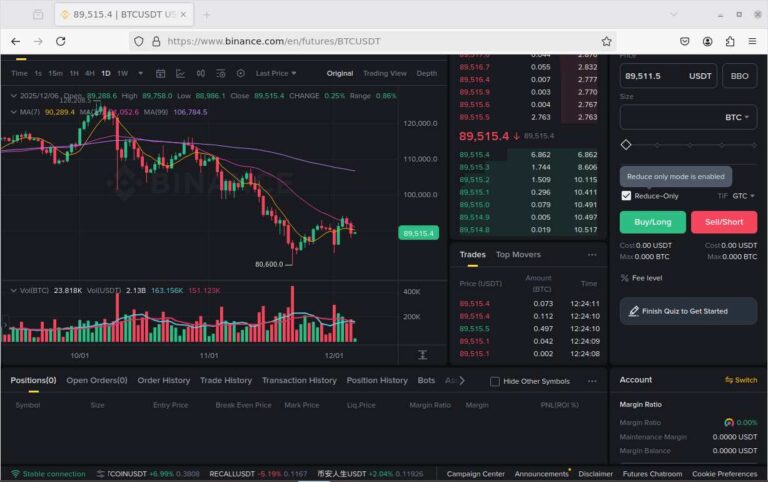
- The trading interface displays a price chart, order book showing current buy and sell orders, and your available balances. Familiarize yourself with these elements before placing orders.
- To place a market order (buy or sell immediately at current market price), select the “Market” tab, enter the amount you wish to trade, and click “Buy BTC” or “Sell BTC” accordingly.
- For limit orders (buy or sell at a specific price), select the “Limit” tab, enter your desired price and amount, then click the buy or sell button. Your order will execute only when the market reaches your specified price.
- Binance also offers stop-limit orders for advanced trading strategies. These allow you to set trigger prices that automatically place limit orders when market conditions meet your criteria, useful for protecting profits or limiting losses.
- Monitor your open orders in the “Open Orders” section. You can cancel any unfilled orders by clicking the “Cancel” button next to the order. Completed trades appear in your “Order History” for record-keeping.
How to withdraw cryptocurrency from your Binance account
- Log into your Binance account and navigate to the “Wallet” section, then click “Withdraw” from the available options.
- Select the cryptocurrency you wish to withdraw from your portfolio. Ensure you have sufficient balance including any applicable withdrawal fees.
- Carefully enter the destination wallet address where you want to send your cryptocurrency. Triple-check this address for accuracy – blockchain transactions are irreversible, and sending to an incorrect address means permanent loss of funds.
- Select the appropriate withdrawal network that matches your destination wallet’s supported networks. For example, if withdrawing to a MetaMask wallet, you’d typically select the ERC20 network for Ethereum-based tokens.
- Enter the amount you wish to withdraw. Binance will automatically calculate and display the network fee, which varies based on current blockchain congestion and the specific cryptocurrency.
- Review all withdrawal details carefully on the confirmation screen. Verify the destination address, amount, network, and total fees before proceeding.
- Complete the security verification process, which typically involves confirming the withdrawal via email, SMS, or your Google Authenticator app. Some withdrawals may require additional verification steps depending on your account settings and withdrawal amount.
- Once verified, your withdrawal request will be processed. Most withdrawals are completed within 30 minutes, though some networks may take longer during periods of high congestion. You can track the status of your withdrawal in the “Withdrawal History” section.
- After completion, use a blockchain explorer (like Etherscan for Ethereum or Blockchain.com for Bitcoin) to track your transaction and confirm when funds arrive at your destination wallet.
Binance fees and cost structure
Understanding Binance’s fee structure is essential for maximizing your trading profits. The platform maintains a transparent fee schedule that varies based on trading volume and account tier:
- Trading Fees: Binance charges a standard maker-taker fee of 0.1% per trade. Users who hold Binance Coin (BNB) can pay fees in BNB and receive a 25% discount, reducing the fee to 0.075%. High-volume traders can qualify for reduced fees through Binance’s VIP program.
- Deposit Fees: Most cryptocurrency deposits are free on Binance. However, some tokens may have minimal network fees imposed by the blockchain itself. Fiat deposits via bank transfer are typically free, while credit/debit card deposits may incur 1-3% fees depending on your region.
- Withdrawal Fees: Withdrawal fees vary significantly by cryptocurrency and network. Bitcoin withdrawals might cost 0.0005 BTC, while Ethereum withdrawals could be 0.005 ETH. These fees fluctuate based on network congestion and are clearly displayed before you confirm any withdrawal.
- Conversion Fees: When converting between cryptocurrencies using Binance’s quick conversion feature, expect fees around 0.5-1% depending on the trading pair and market conditions.
Getting help: Binance customer support
Binance provides multiple channels for customer support to assist with account issues, trading problems, or security concerns. The most efficient method is the in-platform chat support available 24/7 through your account dashboard.
For complex issues requiring detailed investigation, you can submit a support ticket through the “Help Center” section. Binance’s support team typically responds within 24-48 hours for most queries. The platform also maintains an extensive knowledge base with articles covering virtually every aspect of using the exchange.
For urgent security matters like suspected account compromise, Binance offers priority support channels. Always keep your account recovery information updated and never share your login credentials or 2FA codes with anyone claiming to be Binance support staff – legitimate support will never ask for this information.
By following this comprehensive guide, you’re now equipped with all the knowledge needed to create a Binance account, fund it securely, execute profitable trades, and withdraw your cryptocurrency earnings safely. Remember that cryptocurrency markets are volatile, so always trade responsibly and only invest what you can afford to lose. Happy trading!
Related Articles